Why I Built EmbTerm — The Serial Terminal I Always Wanted
A personal story about debugging multiple MCUs, managing CLI commands, and trying to find one useful message in thousands of logs.
It usually starts with a few terminal windows.
When working on embedded products, debugging rarely means working with just one MCU.
We might have a main application MCU, a communication controller, a sensor MCU, or other devices connected together. Each one can have its own UART debug interface.
And when the debugging session starts, my screen usually ends up looking something like this:
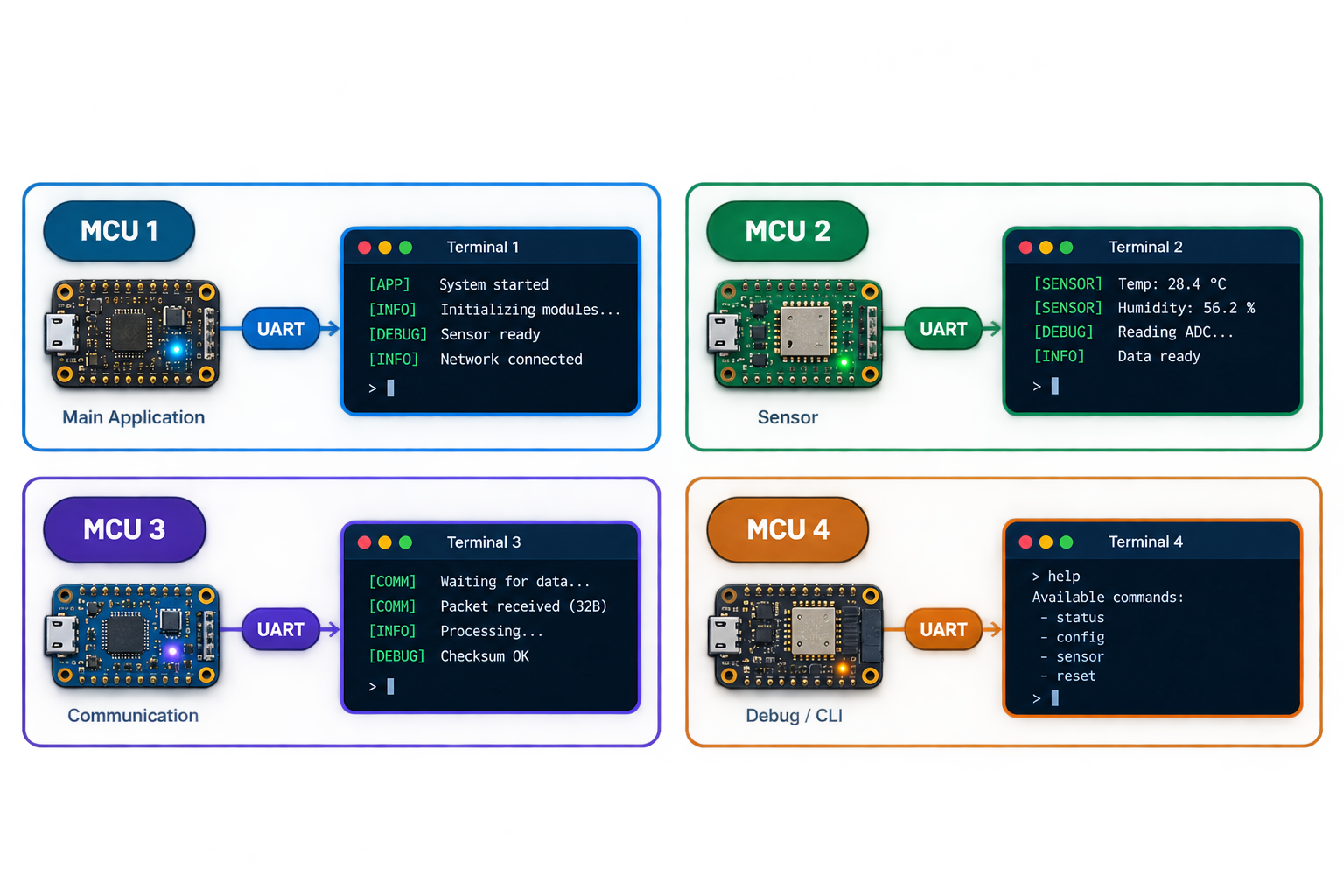
I normally arrange the terminals in a particular order so that I can understand the data flow between the devices just by looking at the screen.
It works.
But after doing this repeatedly, I started asking myself:
Why am I spending so much time managing the terminals instead of debugging the product?
UART is more than just a debug port
In many of our firmware projects, UART doesn’t just print debug messages.
We turn it into a CLI.
That makes a huge difference during development.
Instead of changing something, recompiling the firmware and flashing the device again, we can interact with it directly:
> status

Battery     : 3.02 V
Temperature : 28.4 °C
Network     : Connected
RSSI        : -67 dBm
Or configure something on the fly:
> config radio power 10
OK

> reset
Resetting...
This became an essential part of our workflow.
The device can tell us what is happening, and we can tell the device what to do.
Then came a surprisingly simple problem.
What was that command again?
As the firmware grows, the CLI grows with it.
There might be commands for:
device
status
sensor
network
radio
storage
configuration
diagnostics
...
I know the command exists.
I just don’t remember the exact syntax.
So I run:
> helpThen scroll through the list.
Or I keep the CLI documentation open beside the terminal.
Or search through a document.
Then copy the command back into the terminal.
It’s not a huge problem.
But when you do it hundreds of times during development, it becomes friction.
I started thinking:
The terminal already knows that I’m interacting with a device. Why can’t it help me with the commands as well?
And then there are the logs.
This is where things get really interesting.
As a firmware project grows, the amount of information printed over UART grows with it.
A single device can have messages coming from:
[APP]
[SENSOR]
[BLE]
[WIFI]
[NETWORK]
[STORAGE]
[POWER]
[CLI]
And when several tasks are running simultaneously, the output quickly becomes something like:
[DEBUG] [SENSOR] ADC = 1832
[INFO]  [BLE] Connection event
[DEBUG] [NETWORK] RX packet
[INFO]  [APP] State changed
[WARN]  [BLE] Retry
[DEBUG] [POWER] Sleep
[INFO]  [SENSOR] Sample received
[ERROR] [SENSOR] ADC timeout
[DEBUG] [NETWORK] Packet received
...
Now imagine that I’m looking for one particular message.
Maybe I’m investigating a sensor timeout.
Maybe I want to see only the BLE events.
Maybe I want to know what happened just before a particular error.
And suddenly, finding the message becomes a debugging task of its own.
The usual solution?
Export the logs.
Open them in a text editor.
Search.
Terminal
   ↓
Export log
   ↓
Text editor
   ↓
Ctrl + F
   ↓
Find the message
It works.
But I always felt that the terminal should be able to do this for me.
Why should I have to leave the debugging environment just to find something that is already streaming through it?
That’s when the idea for EmbTerm started.
I wasn’t looking to build another terminal emulator.
I wanted to build the terminal that I wanted to use during embedded development.
Something that understands the workflow:
Multiple MCUs
      ↓
Multiple serial streams
      ↓
Lots of logs
      ↓
CLI commands
      ↓
Configuration
      ↓
Verification
Instead of treating everything as one giant stream of text, I wanted the terminal to become a debugging workspace.
So I started building EmbTerm.
The first goal was simple:
Make the things I repeatedly do during embedded debugging easier.
That led to a few core ideas.
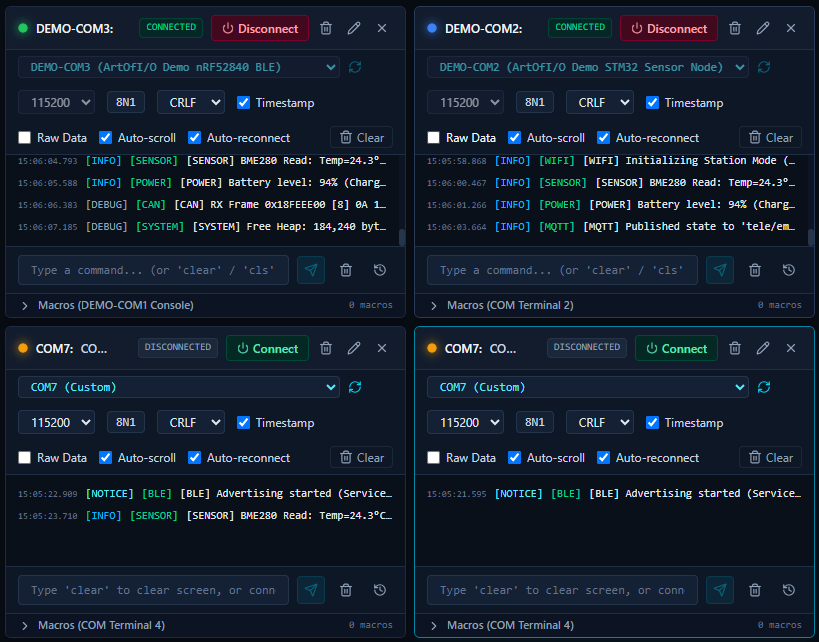
Multiple terminals
Keep several serial connections visible in one workspace.
No more constantly switching between separate terminal applications.
Filter the information you actually need
Instead of reading everything:
10,000 log lines
       ↓
     FILTER
       ↓
ERROR
       ↓
[SENSOR]
       ↓
ADC timeout
I can narrow the stream while it is happening.
Search without exporting logs
If I remember part of a message, I should be able to search for it directly.
No:
Export → Open text editor → Search.
Just search where the logs are already being displayed.
Keep CLI interaction in the same workspace
The terminal isn’t only for observing the device.
It’s also how I control it.
So commands, responses and macros become part of the same workflow.
Keep the workspace
If I’ve spent time arranging four terminals, configuring filters and setting up my debugging environment, I don’t want to recreate everything the next morning.
The workspace should remember it.
The workflow I was looking for
All of this eventually came down to four simple actions:
Observe → Filter → Command → Verify
- Observe what’s happening in the system.
- Filter the information that matters.
- Command the device when you need to change or inspect something.
- Verify the result.
Then repeat.
That’s the workflow I’m trying to make easier with EmbTerm.
EmbTerm is still evolving
This is important to me.
EmbTerm started from my own debugging workflow, so I don’t want to assume that everyone works the same way.
Maybe your workflow involves:
- Dozens of MCUs
- UART + CAN + BLE
- Hardware-in-the-loop testing
- Automated CLI sequences
- Protocol decoding
- Synchronized logs
- Production debugging
- Automated firmware testing
There are probably problems I haven’t encountered yet.
And that’s exactly what I want to learn.
If you’ve faced these problems, try it.
If you work with embedded systems, firmware, hardware bring-up or serial interfaces, I’d love to know:
How does your debugging workflow look today?
And more importantly:
What does your current terminal make unnecessarily difficult?
Try EmbTerm, tell me what works, tell me what doesn’t, and tell me what you’d want it to do next.